
# Home
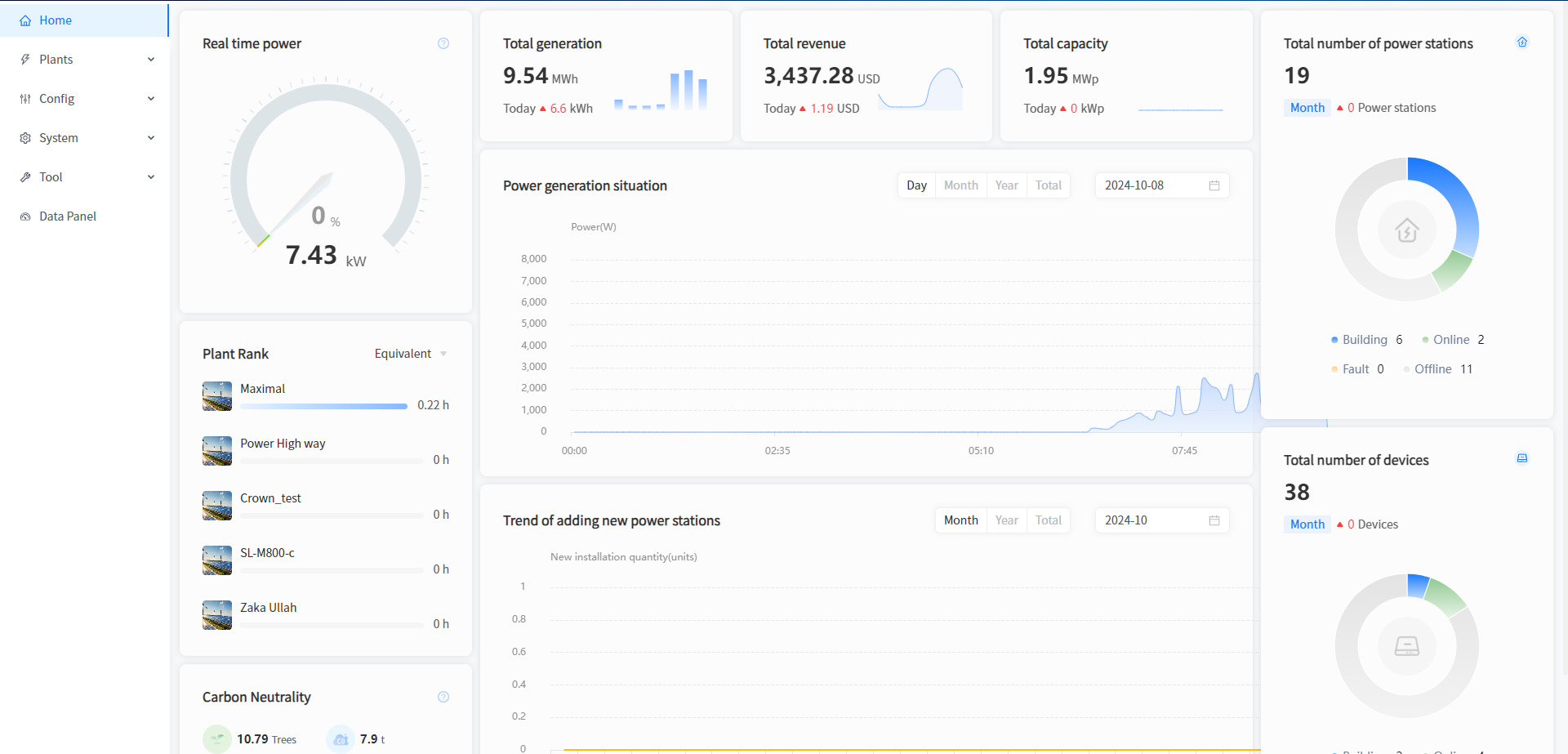
Real time power
[Current power]Display the latest total power generation of all Plants under your name at the current time.
[Power Normalized]Display the current power generation value of the Plant under your name, calculated by the formula: current power/installed power.
Total revenue
[Today]Show the current generation revenue of all Plants under your name. The calculation formula is: the electricity price set at the time of Plant creation multiplied by today's electricity generation.
[Total revenue]Display the cumulative power generation revenue of all Plants under your name. The calculation formula is: the electricity price entered at the time of Plant creation multiplied by the cumulative power generation.
Total generation
[Today]Show the power generation status of all the Plants under your name today.
[Total generation]Show the total electricity generation of all the Plants under your name up to now.
Total capacity
[Total capacity]Show the sum of the rated power of all the Plants under your name.
[Today]Show all the installed capacity of your company today.
Total number of plants
[Total number of Plants]Show how many Plants your company has built in total.
[Month]Show how many new Plants your company has built this month.
[palnt]The circular chart displays the status of all the Plants under your name. Click on the type at the bottom of the statistical chart to directly jump to the corresponding Plant filtering page and view the specific Plant data for that state.
Total number of inverter
[Total number of inverter]Show how many devices have been built under your company in total.
[Month]Show how many devices your company has built this month in total.
[Inverter]The circular diagram displays the status of all equipment under all Plants under your name. Clicking on the type at the bottom of the statistical chart will directly redirect you to the device filtering page for the corresponding state, where you can view the specific device data for that state.
Power generation situation
[Day]Show the power generation status of all the Plants under your name today. You can also click on the date box to select any day and view the power plant power data for that day.
[Month]Show the power generation of all the Plants under your name for this month. You can also click on the date box to select any month and view the power generation data for that month.
[Year]Display the power generation of all the Plants under your name this year. You can also click on the date selection box to select any year and view the power generation data of that year's Plants.
[Total]Display the power generation status of all Plants under your name since their creation.
Plant Rank
[Equivalent]Display the equivalent hourly data of all Plants under your name. The calculation formula is: today's electricity generation/installed power.
[Today Yield]You can click on the dropdown menu in the upper right corner of the Plant ranking and select the "Today's Power Generation" option to view the ranking data of today's power generation for all your Plants.
[Total Yield]You can click on the dropdown menu in the upper right corner of the Plant ranking and select the option of cumulative power generation to view the ranking data of the cumulative power generation of all your Plants.
[Power]You can click on the dropdown menu in the upper right corner of the Plant ranking and select the current power option to view the ranking data of all your Plants' current power.
Trend of adding new plants
[Month]Show the Plant construction status of your company this month. You can also click on the date box to select any month and view the power generation data for that month.
[Year]Display the Plant construction status of your company this year, or click on the date selection box to select any year and view the power generation data for that year.
[Total]Show the Plant construction status of your company since its establishment.
Carbon Neutrality
[Tree]Display the equivalent tree planting situation of all Plants under your name, calculated using the formula: cumulative power generation (kWh) * 0.0011311.
[CO₂]Display the CO ₂ emission reduction status of all Plants under your name. The calculation formula is: CO ₂ emission reduction (ton)=0.000828 * cumulative power generation (kWh).
[Coal]Show the coal saving situation of all the Plants under your name. The calculation formula is: saving standard coal (ton)=0.0003015 * cumulative power generation (kWh).